Table of contents
simdutf: Unicode validation and transcoding at billions of characters per second
Most modern software relies on the Unicode standard. In memory, Unicode strings are represented using either UTF-8 or UTF-16. The UTF-8 format is the de facto standard on the web (JSON, HTML, etc.) and it has been adopted as the default in many popular programming languages (Go, Rust, Swift, etc.). The UTF-16 format is standard in Java, C# and in many Windows technologies.
Not all sequences of bytes are valid Unicode strings. It is unsafe to use Unicode strings in UTF-8 and UTF-16LE without first validating them. Furthermore, we often need to convert strings from one encoding to another, by a process called transcoding. For security purposes, such transcoding should be validating: it should refuse to transcode incorrect strings.
This library provide fast Unicode functions such as
- ASCII, UTF-8, UTF-16LE/BE and UTF-32 validation, with and without error identification,
- Latin1 to UTF-8 transcoding,
- Latin1 to UTF-16LE/BE transcoding
- Latin1 to UTF-32 transcoding
- UTF-8 to Latin1 transcoding, with or without validation, with and without error identification,
- UTF-8 to UTF-16LE/BE transcoding, with or without validation, with and without error identification,
- UTF-8 to UTF-32 transcoding, with or without validation, with and without error identification,
- UTF-16LE/BE to Latin1 transcoding, with or without validation, with and without error identification,
- UTF-16LE/BE to UTF-8 transcoding, with or without validation, with and without error identification,
- UTF-32 to Latin1 transcoding, with or without validation, with and without error identification,
- UTF-32 to UTF-8 transcoding, with or without validation, with and without error identification,
- UTF-32 to UTF-16LE/BE transcoding, with or without validation, with and without error identification,
- UTF-16LE/BE to UTF-32 transcoding, with or without validation, with and without error identification,
- From an UTF-8 string, compute the size of the Latin1 equivalent string,
- From an UTF-8 string, compute the size of the UTF-16 equivalent string,
- From an UTF-8 string, compute the size of the UTF-32 equivalent string (equivalent to UTF-8 character counting),
- From an UTF-16LE/BE string, compute the size of the Latin1 equivalent string,
- From an UTF-16LE/BE string, compute the size of the UTF-8 equivalent string,
- From an UTF-32 string, compute the size of the UTF-8 or UTF-16LE equivalent string,
- From an UTF-16LE/BE string, compute the size of the UTF-32 equivalent string (equivalent to UTF-16 character counting),
- UTF-8 and UTF-16LE/BE character counting.
- UTF-16 endianness change (UTF16-LE/BE to UTF-16-BE/LE)
The functions are accelerated using SIMD instructions (e.g., ARM NEON, SSE, AVX, AVX-512, etc.). When your strings contain hundreds of characters, we can often transcode them at speeds exceeding a billion characters per second. You should expect high speeds not only with English strings (ASCII) but also Chinese, Japanese, Arabic, and so forth. We handle the full character range (including, for example, emojis).
The library compiles down to a small library of a few hundred kilobytes. Our functions are exception-free and non allocating. We have extensive tests and extensive benchmarks.
Real-World Usage
The simdutf library is used by:
- Node.js (19.4.0 or better, 20.0 or better, 18.15 or better), a standard JavaScript runtime environment,
- Bun, a fast JavaScript runtime environment,
- graaljs, a JavaScript implementation by Oracle,
- Couchbase, a popular database system,
- haskell/text, a library for fast operations over Unicode text,
- klogg, a Really fast log explorer,
- Pixie, observability tool for Kubernetes applications.
How fast is it?
The adoption of the simdutf library by the popular Node.js JavaScript runtime lead to a significant performance gain:
Decoding and Encoding becomes considerably faster than in Node.js 18. With the addition of simdutf for UTF-8 parsing the observed benchmark, results improved by 364% (an extremely impressive leap) when decoding in comparison to Node.js 16. (State of Node.js Performance 2023)

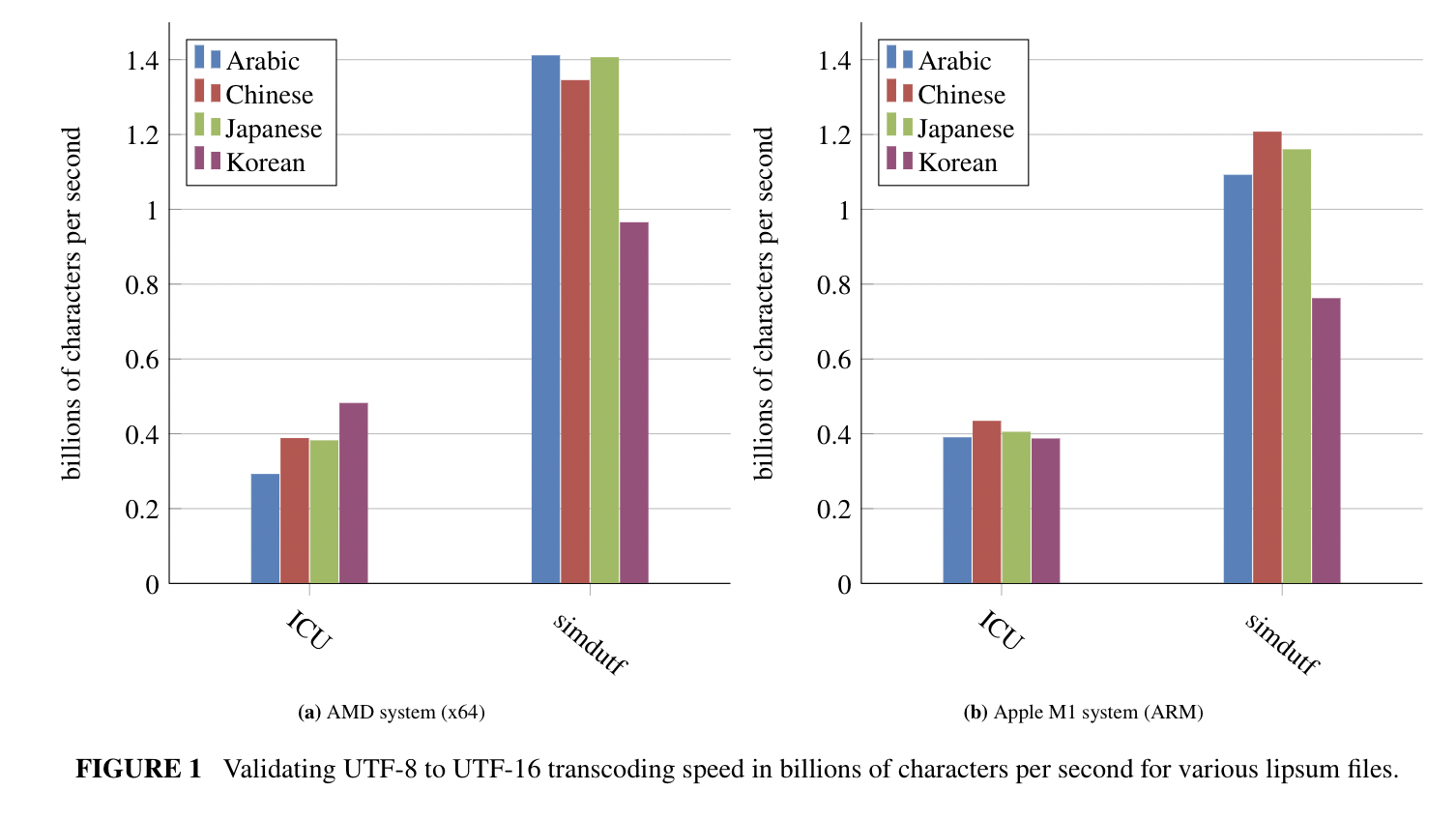
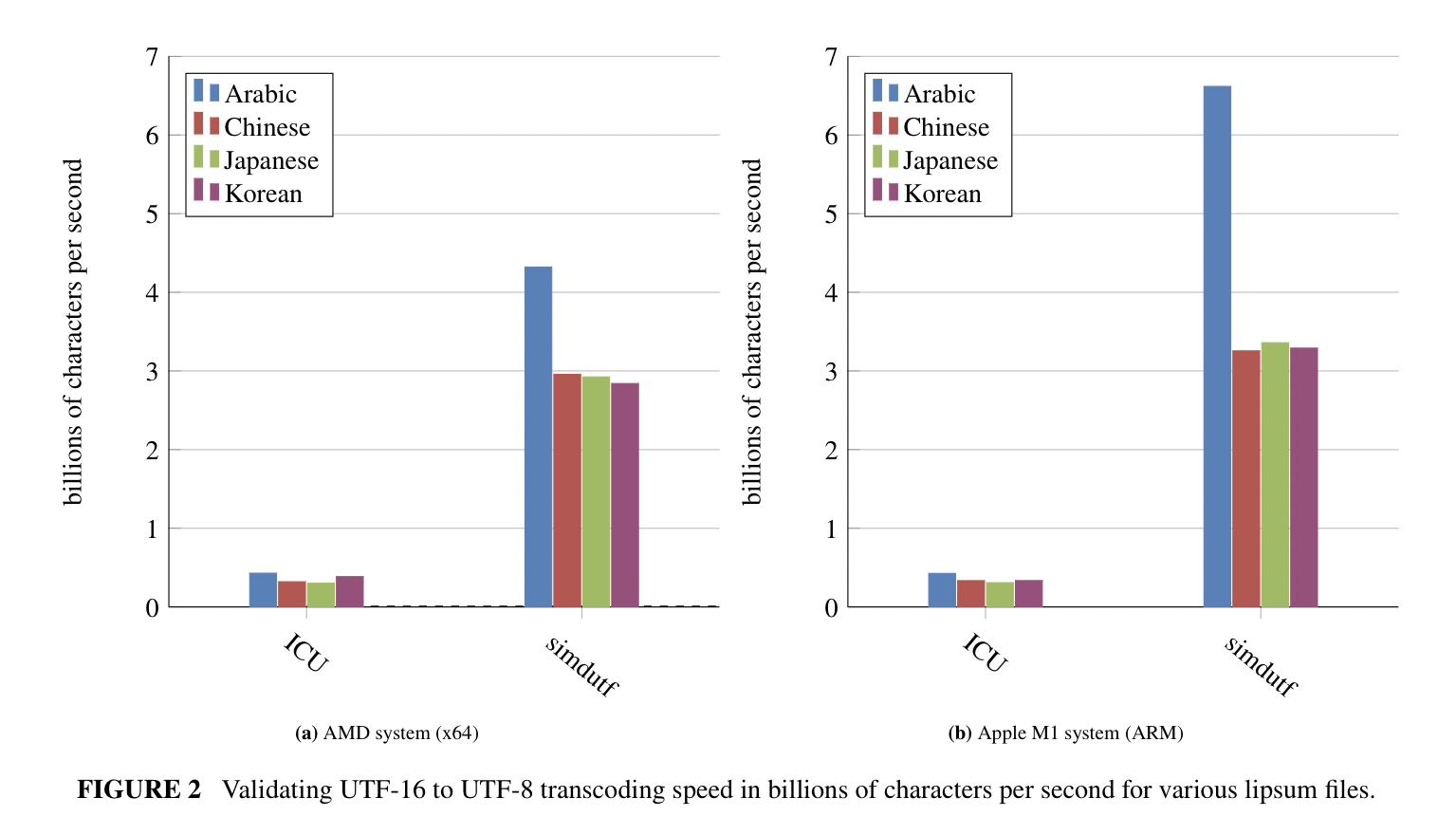
Over a wide range of realistic data sources, the simdutf library transcodes a billion characters per second or more. Our approach can be 3 to 10 times faster than the popular ICU library on difficult (non-ASCII) strings. We can be 20x faster than ICU when processing easy strings (ASCII). Our good results apply to both recent x64 and ARM processors.
To illustrate, we present a benchmark result with values are in billions of characters processed by second. Consider the following figures.


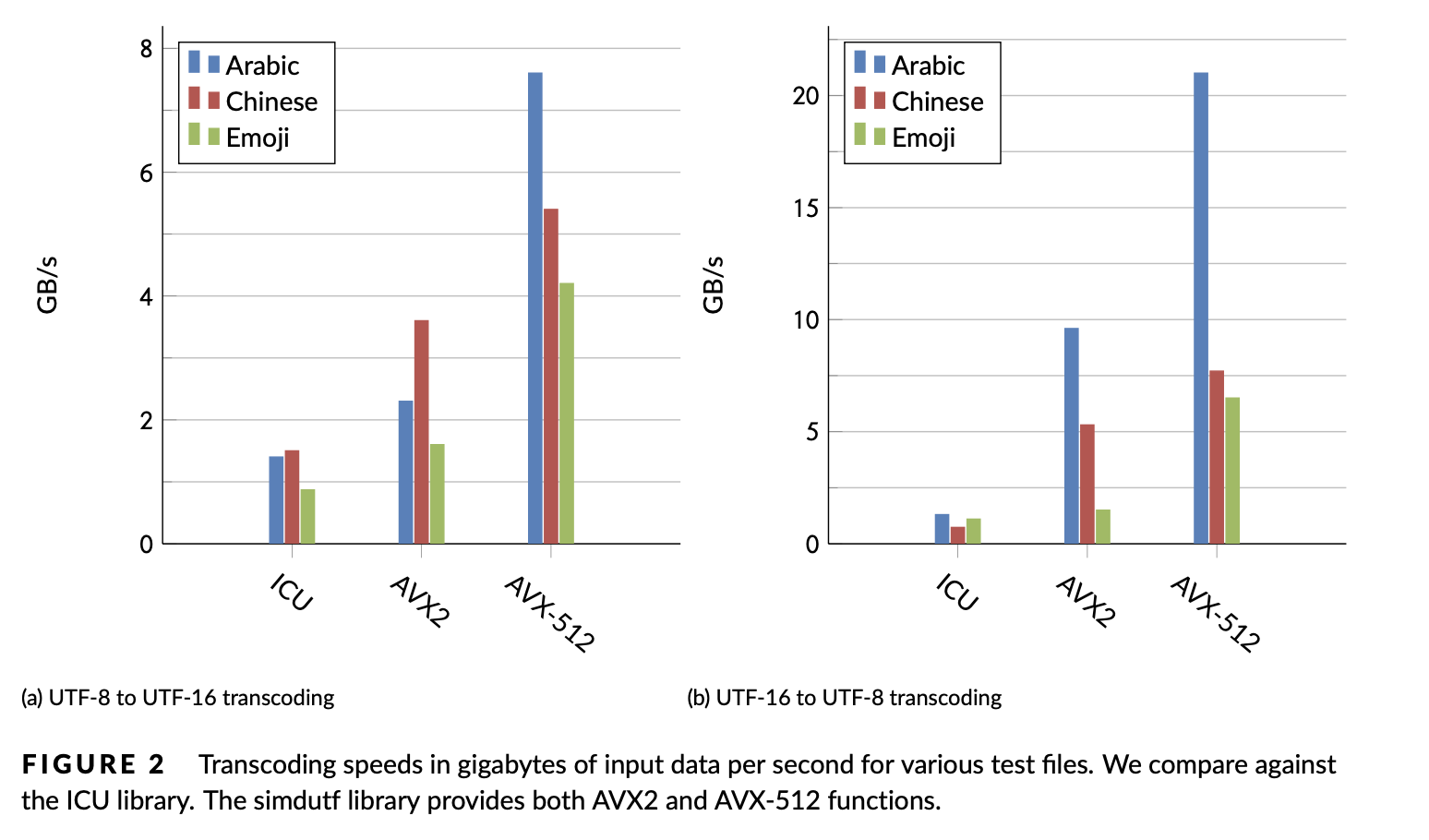
If your system supports AVX-512, the simdutf library can provide very high performance. We get the following speed results on an Ice Lake Intel processor (both AVX2 and AVX-512) are simdutf kernels:

Datasets: https://github.com/lemire/unicode_lipsum
Please refer to our benchmarking tool for a proper interpretation of the numbers. Our results are reproducible.
Requirements
- C++11 compatible compiler. We support LLVM clang, GCC, Visual Studio. (Our optional benchmark tool requires C++17.)
- For high speed, you should have a recent 64-bit system (e.g., ARM or x64).
- If you rely on CMake, you should use a recent CMake (at least 3.15) ; otherwise you may use the single header version. The library is also available from Microsoft's vcpkg.
- AVX-512 support require a processor with AVX512-VBMI2 (Ice Lake or better) and a recent compiler (GCC 8 or better, Visual Studio 2022 or better, LLVM clang 6 or better). You need a correspondingly recent assembler such as gas (2.30+) or nasm (2.14+): recent compilers usually come with recent assemblers. If you mix a recent compiler with an incompatible/old assembler (e.g., when using a recent compiler with an old Linux distribution), you may get errors at build time because the compiler produces instructions that the assembler does not recognize: you should update your assembler to match your compiler (e.g., upgrade binutils to version 2.30 or better under Linux) or use an older compiler matching the capabilities of your assembler.
Usage (Usage)
We made a video to help you get started with the library.

Quick Start
Linux or macOS users might follow the following instructions if they have a recent C++ compiler installed and the standard utilities (wget, unzip, etc.)
- Pull the library in a directory
wget https://github.com/simdutf/simdutf/releases/download/v4.0.8/singleheader.zip
unzip singleheader.zip
- Compile
c++ -std=c++17 -o amalgamation_demo amalgamation_demo.cpp
./amalgamation_demo
valid UTF-8
wrote 4 UTF-16LE words.
valid UTF-16LE
wrote 4 UTF-8 words.
1234
perfect round trip
Usage (CMake)
cmake -B build
cmake --build build
cd build
ctest .
Visual Studio users must specify whether they want to build the Release or Debug version.
To run benchmarks, execute the benchmark command. You can get help on its usage by first building it and then calling it with the --help flag. E.g., under Linux you may do the following:
cmake -B build
cmake --build build
./build/benchmarks/benchmark --help
Instructions are similar for Visual Studio users.
To use the library as a CMake dependency in your project, please see tests/installation_tests/from_fetch for an example.
Since ICU is so common and popular, we assume that you may have it already on your system. When it is not found, it is simply omitted from the benchmarks. Thus, to benchmark against ICU, make sure you have ICU installed on your machine and that cmake can find it. For macOS, you may install it with brew using brew install icu4c. If you have ICU on your system but cmake cannot find it, you may need to provide cmake with a path to ICU, such as ICU_ROOT=/usr/local/opt/icu4c cmake -B build.
Single-header version
You can create a single-header version of the library where all of the code is put into two files (simdutf.h and simdutf.cpp). We publish a zip archive containing these files, e.g., see https://github.com/simdutf/simdutf/releases/download/v4.0.8/singleheader.zip
You may generate it on your own using a Python script.
python3 ./singleheader/amalgamate.py
We require Python 3 or better.
Under Linux and macOS, you may test it as follows:
cd singleheader
c++ -o amalgamation_demo amalgamation_demo.cpp -std=c++17
./amalgamation_demo
Example
Using the single-header version, you could compile the following program.
#include <iostream>
#include <memory>
#include "simdutf.cpp"
#include "simdutf.h"
int main(int argc, char *argv[]) {
const char *source = "1234";
bool validutf8 = simdutf::validate_utf8(source, 4);
if (validutf8) {
std::cout << "valid UTF-8" << std::endl;
} else {
std::cerr << "invalid UTF-8" << std::endl;
return EXIT_FAILURE;
}
size_t expected_utf16words = simdutf::utf16_length_from_utf8(source, 4);
std::unique_ptr<char16_t[]> utf16_output{new char16_t[expected_utf16words]};
size_t utf16words =
simdutf::convert_utf8_to_utf16le(source, 4, utf16_output.get());
std::cout << "wrote " << utf16words << " UTF-16LE code units." << std::endl;
bool validutf16 = simdutf::validate_utf16le(utf16_output.get(), utf16words);
if (validutf16) {
std::cout << "valid UTF-16LE" << std::endl;
} else {
std::cerr << "invalid UTF-16LE" << std::endl;
return EXIT_FAILURE;
}
size_t expected_utf8words =
simdutf::utf8_length_from_utf16le(utf16_output.get(), utf16words);
std::unique_ptr<char[]> utf8_output{new char[expected_utf8words]};
size_t utf8words = simdutf::convert_utf16le_to_utf8(
utf16_output.get(), utf16words, utf8_output.get());
std::cout << "wrote " << utf8words << " UTF-8 code units." << std::endl;
std::string final_string(utf8_output.get(), utf8words);
std::cout << final_string << std::endl;
if (final_string != source) {
std::cerr << "bad conversion" << std::endl;
return EXIT_FAILURE;
} else {
std::cerr << "perfect round trip" << std::endl;
}
return EXIT_SUCCESS;
}
API
Our API is made of a few non-allocating functions. They typically take a pointer and a length as a parameter, and they sometimes take a pointer to an output buffer. Users are responsible for memory allocation.
We use three types of data pointer types:
char* for UTF-8 or indeterminate Unicode formats,
char16_t* for UTF-16 (both UTF-16LE and UTF-16BE),
char32_t* for UTF-32. UTF-32 is primarily used for internal use, not data interchange. Thus, unless otherwise stated, char32_t refers to the native type and is typically UTF-32LE since virtually all systems are little-endian today. In generic terms, we refer to char, char16_t, and char32_t as code units. A character may use several code units: between 1 and 4 code units in UTF-8, and between 1 and 2 code units in UTF-16LE and UTF-16BE.
Our functions and declarations are all in the simdutf namespace. Thus you should prefix our functions and types with simdutf:: as required.
We have basic functions to detect the type of an input. They return an integer defined by the following enum.
enum encoding_type {
UTF8 = 1,
UTF16_LE = 2,
UTF16_BE = 4,
UTF32_LE = 8,
UTF32_BE = 16,
unspecified = 0
};
simdutf_warn_unused simdutf::encoding_type autodetect_encoding(const char * input, size_t length) noexcept;
simdutf_warn_unused int detect_encodings(const char * input, size_t length) noexcept;
For validation and transcoding, we also provide functions that will stop on error and return a result struct which is a pair of two fields:
struct result {
error_code error;
size_t count;
};
On error, the error field indicates the type of error encountered and the count field indicates the position of the error in the input in code units or the number of characters validated/written. We report six types of errors related to Latin1, UTF-8, UTF-16 and UTF-32 encodings:
enum error_code {
SUCCESS = 0,
HEADER_BITS,
TOO_SHORT,
TOO_LONG,
OVERLONG,
TOO_LARGE,
SURROGATE,
OTHER
};
On success, the error field is set to SUCCESS and the position field indicates either the number of code units validated for validation functions or the number of written code units in the output format for transcoding functions. In ASCII, Latin1 and UTF-8, code units occupy 8 bits (they are bytes); in UTF-16LE and UTF-16BE, code units occupy 16 bits; in UTF-32, code units occupy 32 bits.
Generally speaking, functions that report errors always stop soon after an error is encountered and might therefore be faster on inputs where an error occurs early in the input. The functions that return a boolean indicating whether or not an error has been encountered are meant to be used in an optimistic setting—when we expect that inputs will almost always be correct.
You may use functions that report an error to indicate where the problem happens during, as follows:
std::string bad_ascii = "\x20\x20\x20\x20\x20\xff\x20\x20\x20";
simdutf::result res = implementation.validate_ascii_with_errors(bad_ascii.data(), bad_ascii.size());
if(res.error != simdutf::error_code::SUCCESS) {
std::cerr << "error at index " << res.count << std::endl;
}
Or as follows:
std::string bad_utf8 = "\xc3\xa9\xc3\xa9\x20\xff\xc3\xa9";
simdutf::result res = implementation.validate_utf8_with_errors(bad_utf8.data(), bad_utf8.size());
if(res.error != simdutf::error_code::SUCCESS) {
std::cerr << "error at index " << res.count << std::endl;
}
res = implementation.validate_utf8_with_errors(bad_utf8.data(), res.count);
if(res.error == simdutf::error_code::SUCCESS) {
std::cerr << "we have " << res.count << "valid bytes" << std::endl;
}
We have fast validation functions.
simdutf_warn_unused bool validate_ascii(const char *buf, size_t len) noexcept;
simdutf_warn_unused result validate_ascii_with_errors(const char *buf, size_t len) noexcept;
simdutf_warn_unused bool validate_utf8(const char *buf, size_t len) noexcept;
simdutf_warn_unused result validate_utf8_with_errors(const char *buf, size_t len) noexcept;
simdutf_warn_unused bool validate_utf16(const char16_t *buf, size_t len) noexcept;
simdutf_warn_unused bool validate_utf16le(const char16_t *buf, size_t len) noexcept;
simdutf_warn_unused bool validate_utf16be(const char16_t *buf, size_t len) noexcept;
simdutf_warn_unused result validate_utf16_with_errors(const char16_t *buf, size_t len) noexcept;
simdutf_warn_unused result validate_utf16le_with_errors(const char16_t *buf, size_t len) noexcept;
simdutf_warn_unused result validate_utf16be_with_errors(const char16_t *buf, size_t len) noexcept;
simdutf_warn_unused bool validate_utf32(const char32_t *buf, size_t len) noexcept;
simdutf_warn_unused result validate_utf32_with_errors(const char32_t *buf, size_t len) noexcept;
Given a valid UTF-8 or UTF-16 input, you may count the number Unicode characters using fast functions. For UTF-32, there is no need for a function given that each character requires a flat 4 bytes. Likewise for Latin1: one byte will always equal one character.
simdutf_warn_unused size_t count_utf16(const char16_t * input, size_t length) noexcept;
simdutf_warn_unused size_t count_utf16le(const char16_t * input, size_t length) noexcept;
simdutf_warn_unused size_t count_utf16be(const char16_t * input, size_t length) noexcept;
simdutf_warn_unused size_t count_utf8(const char * input, size_t length) noexcept;
Prior to transcoding an input, you need to allocate enough memory to receive the result. We have fast function that scan the input and compute the size of the output. These functions are fast and non-validating.
simdutf_warn_unused size_t utf8_length_from_latin1(const char * input, size_t length) noexcept;
simdutf_warn_unused size_t latin1_length_from_utf8(const char * input, size_t length) noexcept;
simdutf_warn_unused size_t latin1_length_from_utf16(size_t length) noexcept;
simdutf_warn_unused size_t latin1_length_from_utf32(size_t length) noexcept;
simdutf_warn_unused size_t utf16_length_from_utf8(const char * input, size_t length) noexcept;
simdutf_warn_unused size_t utf32_length_from_utf8(const char * input, size_t length) noexcept;
simdutf_warn_unused size_t utf8_length_from_utf16(const char16_t * input, size_t length) noexcept;
simdutf_warn_unused size_t utf8_length_from_utf16le(const char16_t * input, size_t length) noexcept;
simdutf_warn_unused size_t utf8_length_from_utf16be(const char16_t * input, size_t length) noexcept;
simdutf_warn_unused size_t utf8_length_from_utf32(const char32_t * input, size_t length) noexcept;
simdutf_warn_unused size_t utf16_length_from_utf32(const char32_t * input, size_t length) noexcept;
simdutf_warn_unused size_t utf32_length_from_utf16(const char16_t * input, size_t length) noexcept;
simdutf_warn_unused size_t utf32_length_from_utf16le(const char16_t * input, size_t length) noexcept;
simdutf_warn_unused size_t utf32_length_from_utf16be(const char16_t * input, size_t length) noexcept;
We have a wide range of conversion between Latin1, UTF-8, UTF-16 and UTF-32. They assume that you are allocated sufficient memory for the input. The simplest conversin function output a single integer representing the size of the input, with a value of zero indicating an error (e.g., convert_utf8_to_utf16le). They are well suited in the scenario where you expect the input to be valid most of the time.
simdutf_warn_unused size_t convert_latin1_to_utf8(const char * input, size_t length, char* utf8_output) noexcept;
simdutf_warn_unused size_t convert_latin1_to_utf16(const char * input, size_t length, char16_t* utf16_output) noexcept;
simdutf_warn_unused size_t convert_latin1_to_utf16le(const char * input, size_t length, char16_t* utf16_output) noexcept;
simdutf_warn_unused size_t convert_latin1_to_utf16be(const char * input, size_t length, char16_t* utf16_output) noexcept;
simdutf_warn_unused size_t convert_latin1_to_utf32(const char * input, size_t length, char32_t* utf32_buffer) noexcept;
simdutf_warn_unused size_t convert_utf8_to_latin1(const char * input, size_t length, char* latin1_output) noexcept;
simdutf_warn_unused size_t convert_utf8_to_utf16(const char * input, size_t length, char16_t* utf16_output) noexcept;
simdutf_warn_unused size_t convert_utf8_to_utf16le(const char * input, size_t length, char16_t* utf16_output) noexcept;
simdutf_warn_unused size_t convert_utf8_to_utf16be(const char * input, size_t length, char16_t* utf16_output) noexcept;
simdutf_warn_unused size_t convert_utf8_to_utf32(const char * input, size_t length, char32_t* utf32_output) noexcept;
simdutf_warn_unused size_t convert_utf16_to_latin1(const char16_t * input, size_t length, char* latin1_buffer) noexcept;
simdutf_warn_unused size_t convert_utf16le_to_latin1(const char16_t * input, size_t length, char* latin1_buffer) noexcept;
simdutf_warn_unused size_t convert_utf16be_to_latin1(const char16_t * input, size_t length, char* latin1_buffer) noexcept;
simdutf_warn_unused size_t convert_utf16le_to_utf8(const char16_t * input, size_t length, char* utf8_buffer) noexcept;
simdutf_warn_unused size_t convert_utf16be_to_utf8(const char16_t * input, size_t length, char* utf8_buffer) noexcept;
simdutf_warn_unused size_t convert_utf32_to_latin1(const char32_t * input, size_t length, char* latin1_buffer) noexcept;
simdutf_warn_unused size_t convert_utf32_to_utf8(const char32_t * input, size_t length, char* utf8_buffer) noexcept;
simdutf_warn_unused size_t convert_utf32_to_utf16(const char32_t * input, size_t length, char16_t* utf16_buffer) noexcept;
simdutf_warn_unused size_t convert_utf32_to_utf16le(const char32_t * input, size_t length, char16_t* utf16_buffer) noexcept;
simdutf_warn_unused size_t convert_utf32_to_utf16be(const char32_t * input, size_t length, char16_t* utf16_buffer) noexcept;
simdutf_warn_unused size_t convert_utf16_to_utf32(const char16_t * input, size_t length, char32_t* utf32_buffer) noexcept;
simdutf_warn_unused size_t convert_utf16le_to_utf32(const char16_t * input, size_t length, char32_t* utf32_buffer) noexcept;
simdutf_warn_unused size_t convert_utf16be_to_utf32(const char16_t * input, size_t length, char32_t* utf32_buffer) noexcept;
In some cases, you need to transcode UTF-8 or UTF-16 inputs, but you may have a truncated string, meaning that the last character might be incomplete. In such cases, we recommend trimming the end of your input so you do not encounter an error.
simdutf_warn_unused size_t trim_partial_utf8(const char *input, size_t length);
simdutf_warn_unused size_t trim_partial_utf16be(const char16_t* input, size_t length);
simdutf_warn_unused size_t trim_partial_utf16le(const char16_t* input, size_t length);
simdutf_warn_unused size_t trim_partial_utf16(const char16_t* input, size_t length);
You may use these trim_ functions to decode inputs piece by piece, as in the following examples. First a case where you want to decode a UTF-8 strings in two steps:
const char unicode[] = "\xc3\xa9\x63ole d'\xc3\xa9t\xc3\xa9";
size_t length = 10;
length = simdutf::trim_partial_utf8(unicode, length);
size_t budget_utf16 = simdutf::utf16_length_from_utf8(unicode, length);
std::unique_ptr<char16_t[]> utf16{new char16_t[budget_utf16]};
size_t utf16words =
simdutf::convert_utf8_to_utf16le(unicode, length, utf16.get());
const char * next = unicode + length;
size_t next_length = sizeof(unicode) - length;
size_t next_budget_utf16 = simdutf::utf16_length_from_utf8(next, next_length);
std::unique_ptr<char16_t[]> next_utf16{new char16_t[next_budget_utf16]};
size_t next_utf16words =
simdutf::convert_utf8_to_utf16le(next, next_length, next_utf16.get());
You can use the same approach with UTF-16:
const char16_t unicode[] = u"\x3cd8\x10df\x3cd8\x10df\x3cd8\x10df";
size_t length = 3;
length = simdutf::trim_partial_utf16(unicode, length);
size_t budget_utf8 = simdutf::utf8_length_from_utf16(unicode, length);
std::unique_ptr<char[]> utf8{new char[budget_utf8]};
size_t utf8words =
simdutf::convert_utf16_to_utf8(unicode, length, utf8.get());
const char16_t * next = unicode + length;
size_t next_length = 6 - length;
size_t next_budget_utf8 = simdutf::utf8_length_from_utf16(next, next_length);
std::unique_ptr<char[]> next_utf8{new char[next_budget_utf8]};
size_t next_utf8words =
simdutf::convert_utf16_to_utf8(next, next_length, next_utf8.get());
We have more advanced conversion functions which output a simdutf::result structure with an indication of the error type and a count entry (e.g., convert_utf8_to_utf16le_with_errors). They are well suited when you expect that there might be errors in the input that require further investigation. The count field contains the location of the error in the input in code units, if there is an error, or otherwise the number of code units written. You may use these functions as follows:
std::string bad_utf8 = "\xc3\xa9\xc3\xa9\x20\xff\xc3\xa9";
size_t budget_utf16 = simdutf::utf16_length_from_utf8(bad_utf8.data(), bad_utf8.size());
std::unique_ptr<char16_t[]> utf16{new char16_t[budget_utf16]};
simdutf::result res = simdutf::convert_utf8_to_utf16_with_errors(bad_utf8.data(), bad_utf8.size(), utf16.get());
if(res.error != simdutf::error_code::SUCCESS) {
std::cerr << "error at index " << res.count << std::endl;
}
res = simdutf::convert_utf8_to_utf16_with_errors(bad_utf8.data(), res.count, utf16.get());
if(res.error == simdutf::error_code::SUCCESS) {
std::cerr << "we have transcoded " << res.count << " characters" << std::endl;
}
We have several transcoding functions returning simdutf::error results:
simdutf_warn_unused result convert_utf8_to_latin1_with_errors(const char * input, size_t length, char* latin1_output) noexcept;
simdutf_warn_unused result convert_utf16le_to_latin1_with_errors(const char16_t * input, size_t length, char* latin1_buffer) noexcept;
simdutf_warn_unused result convert_utf16be_to_latin1_with_errors(const char16_t * input, size_t length, char* latin1_buffer) noexcept;
simdutf_warn_unused result convert_utf16_to_latin1_with_errors(const char16_t * input, size_t length, char* latin1_buffer) noexcept;
simdutf_warn_unused result convert_utf8_to_utf16_with_errors(const char * input, size_t length, char16_t* utf16_output) noexcept;
simdutf_warn_unused result convert_utf8_to_utf16le_with_errors(const char * input, size_t length, char16_t* utf16_output) noexcept;
simdutf_warn_unused result convert_utf8_to_utf16be_with_errors(const char * input, size_t length, char16_t* utf16_output) noexcept;
simdutf_warn_unused result convert_utf8_to_utf32_with_errors(const char * input, size_t length, char32_t* utf32_output) noexcept;
simdutf_warn_unused result convert_utf16le_to_utf8_with_errors(const char16_t * input, size_t length, char* utf8_buffer) noexcept;
simdutf_warn_unused result convert_utf16be_to_utf8_with_errors(const char16_t * input, size_t length, char* utf8_buffer) noexcept;
simdutf_warn_unused result convert_utf32_to_latin1_with_errors(const char32_t * input, size_t length, char* latin1_buffer) noexcept;
simdutf_warn_unused result convert_utf32_to_utf8_with_errors(const char32_t * input, size_t length, char* utf8_buffer) noexcept;
simdutf_warn_unused result convert_utf32_to_utf16_with_errors(const char32_t * input, size_t length, char16_t* utf16_buffer) noexcept;
simdutf_warn_unused result convert_utf32_to_utf16le_with_errors(const char32_t * input, size_t length, char16_t* utf16_buffer) noexcept;
simdutf_warn_unused result convert_utf32_to_utf16be_with_errors(const char32_t * input, size_t length, char16_t* utf16_buffer) noexcept;
simdutf_warn_unused result convert_utf16_to_utf32_with_errors(const char16_t * input, size_t length, char32_t* utf32_buffer) noexcept;
simdutf_warn_unused result convert_utf16le_to_utf32_with_errors(const char16_t * input, size_t length, char32_t* utf32_buffer) noexcept;
simdutf_warn_unused result convert_utf16be_to_utf32_with_errors(const char16_t * input, size_t length, char32_t* utf32_buffer) noexcept;
If you have a UTF-16 input, you may change its endianess with a fast function.
void change_endianness_utf16(const char16_t * input, size_t length, char16_t * output) noexcept;
The sutf command-line tool
We also provide a command-line tool which can be build as follows:
cmake -B build && cmake --build build --target sutf
This command builds the executable in ./build/tool/ under most platforms. The sutf tool enables the user to easily transcode files from one encoding to another directly from the command line. The usage is similar to iconv (see sutf --help for more details). The sutf command-line tool relies on the simdutf library functions for fast transcoding of supported formats (UTF-8, UTF-16LE, UTF-16BE and UTF-32). If iconv is found on the system and simdutf does not support a conversion, the sutf tool falls back on iconv: a message lets the user know if iconv is available during compilation. The following is an example of transcoding two input files to an output file, from UTF-8 to UTF-16LE:
sutf -f UTF-8 -t UTF-16LE -o output_file.txt first_input_file.txt second_input_file.txt
Manual implementation selection
When compiling the llibrary for x64 processors, we build several implementations of each functions. At runtime, the best implementation is picked automatically. Advanced users may want to pick a particular implementation, thus bypassing our runtime detection. It is possible and even relatively convenient to do so. The following C++ program checks all the available implementation, and selects one as the default:
#include "simdutf.h"
#include <cstdlib>
#include <iostream>
#include <string>
int main() {
std::string source = "La vie est belle.";
std::string chosen_implementation;
for (auto &implementation : simdutf::get_available_implementations()) {
if (!implementation->supported_by_runtime_system()) {
continue;
}
bool validutf8 = implementation->validate_utf8(source.c_str(), source.size());
if (!validutf8) {
return EXIT_FAILURE;
}
std::cout << implementation->name() << ": " << implementation->description()
<< std::endl;
chosen_implementation = implementation->name();
}
auto my_implementation =
simdutf::get_available_implementations()[chosen_implementation];
if (!my_implementation) {
return EXIT_FAILURE;
}
if (!my_implementation->supported_by_runtime_system()) {
return EXIT_FAILURE;
}
simdutf::get_active_implementation() = my_implementation;
bool validutf8 = simdutf::validate_utf8(source.c_str(), source.size());
if (!validutf8) {
return EXIT_FAILURE;
}
if (simdutf::get_active_implementation()->name() != chosen_implementation) {
return EXIT_FAILURE;
}
std::cout << "I have manually selected: " << simdutf::get_active_implementation()->name() << std::endl;
return EXIT_SUCCESS;
}
Within the simdutf library,
References
- Robert Clausecker, Daniel Lemire, Transcoding Unicode Characters with AVX-512 Instructions, Software: Practice and Experience (to appear).
- Daniel Lemire, Wojciech Muła, Transcoding Billions of Unicode Characters per Second with SIMD Instructions, Software: Practice and Experience52 (2), 2022.
- John Keiser, Daniel Lemire, Validating UTF-8 In Less Than One Instruction Per Byte, Software: Practice and Experience 51 (5), 2021.
License
This code is made available under the Apache License 2.0 as well as the MIT license. As a user, you can pick the license you prefer.
We include a few competitive solutions under the benchmarks/competition directory. They are provided for research purposes only.